

Top Unity Reskin Workflow Hacks + Hyper Casual Templates Guide
Learn how to reskin Unity hyper-casual games faster using proven workflow hacks. Discover the best Unity game templates and source code to launch quickly.
Top Unity Reskin Workflow Hacks + Hyper Casual Templates Guide
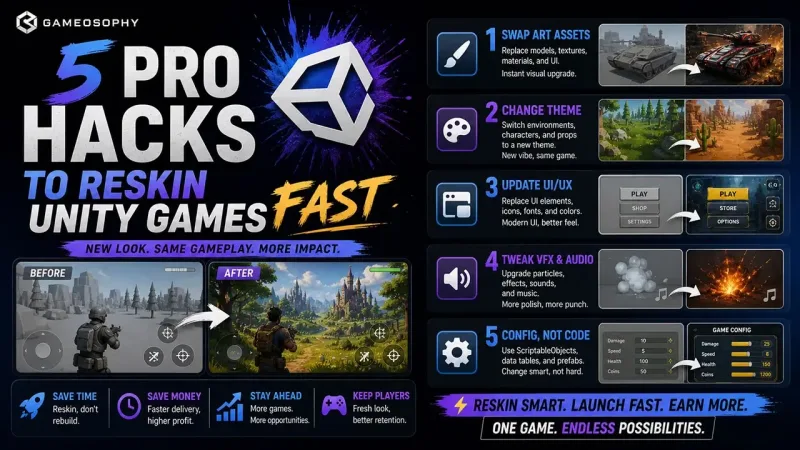
🎯 Top 5 Workflow Hacks to Reskin Hyper-Casual Unity Games Faster (Helix Jump Style)
🎮 Introduction: Why “Simple” Games Are Hard to Build
Hyper-casual games like Helix Jump, Stack Ball, and Color Bump 3D look simple—but behind the scenes, they rely on complex Unity physics, optimized rendering, and procedural systems.
For indie developers, building these systems from scratch can take weeks or even months.
👉 That’s why smart developers use Unity game templates and source code to speed up development.
But buying a template is just the beginning.
To truly succeed, you need a professional Unity workflow to reskin, optimize, and launch your game fast.
In this guide, you’ll learn:
- ✅ 5 proven workflow hacks for Unity reskinning
- ✅ How to safely modify Unity game templates
- ✅ Best hyper-casual Unity source codes to start with
⚡ Part 1: 5 Workflow Hacks to Reskin Unity Games Efficiently
Most beginners fail because they accidentally break the core physics or gameplay logic.
Here’s how to avoid that 👇
🧩 1. The “Tower Sandbox” Strategy (Safe Editing)
Problem: Editing original prefabs directly → breaks gameplay
Solution: Always duplicate before editing
✔ Create a new folder like _Reskin_Project
✔ Duplicate key prefabs (Tower, Player, Obstacles)
✔ Work only inside your sandbox
Result:
You can experiment freely without damaging the original system.
🎨 2. Use Prefab Variants (Don’t Break Logic)
Problem: Changing prefab structure → scripts stop working
Solution: Use Prefab Variants
✔ Create variants like:
- Ice Tower
- Lava Tower
- Neon Tower
✔ Keep original scripts intact
Benefit:
You can change visuals without touching gameplay logic.
🧠 3. Use Scriptable Objects for Level Design
Problem: Hardcoding difficulty in scripts
Solution: Use ScriptableObject data
Create profiles like:
- Easy Mode → slow speed, large gaps
- Hard Mode → fast speed, tight gaps
Why it matters:
You can generate hundreds of levels without coding again.
🚀 4. Optimize Performance with Material Batching
Problem: Too many materials = lag on mobile
Solution: Use:
- Shared materials
- Texture atlases
Result:
✔ Fewer draw calls
✔ Better FPS
✔ Smooth gameplay on low-end devices
📱 5. UI Safe Area Optimization (Notch-Friendly)
Problem: UI gets hidden behind notches
Solution: Use Unity Device Simulator
✔ Test on iPhone & Android devices
✔ Adjust UI using Safe Area
Pro Tip:
Always keep score and UI visible across all screen sizes.
📦 Part 2: Best Hyper-Casual Unity Source Codes (Ready to Use)
Now that you know the workflow, start with ready-made Unity game templates.
🎯 1. Helix Jump 3D Unity Template
Best For: Classic arcade gameplay
✔ Complete tower + ball physics
✔ Procedural level generation
✔ AdMob integration ready
👉 Perfect for fast reskin & publishing
🎨 2. Color Swipe (Puzzle Game)
Best For: Color-based mechanics
✔ Addictive gameplay loop
✔ Easy to reskin
✔ Great for casual audience
🚀 3. Endless Tunnel 3D
Best For: High-speed gameplay
✔ Infinite level system
✔ Optimized for performance
✔ Ideal for mobile games
⚙️ 4. Stone Balls (Physics Puzzle)
Best For: Physics-based gameplay
✔ Smooth physics interaction
✔ Clean Unity code
✔ Easy to modify mechanics
🌌 5. Space Climber
Best For: Vertical progression games
✔ Unique upward gameplay
✔ Strong retention mechanics
✔ Perfect for quick iterations
📈 Why Use Unity Templates & Source Code?
Using Unity game templates gives you:
- Faster development time
- Proven gameplay systems
- Clean and scalable code
- Quick deployment to Play Store & App Store
👉 Instead of building from scratch, you focus on game polish and monetization
🏁 Final Thoughts: Build Faster, Launch Smarter
In today’s competitive market, speed matters.
The most successful indie developers:
✔ Don’t reinvent the wheel
✔ Use Unity assets and templates
✔ Focus on gameplay and user experience
✔ Launch games quickly
By combining:
👉 Gameosophy Unity source code
👉 Smart reskin workflows
You create a production-ready pipeline for launching games faster 🚀
🚀 Call to Action
👉 Want to launch your own hyper-casual game?
Explore ready-made Unity game templates, assets, and source code at Gameosophy and start building today.